Embark on a journey to unlock the secrets of savvy shopping! This guide, “How to Stack Multiple Discounts on a Single Purchase,” dives into the art of maximizing your savings. It’s about transforming ordinary shopping trips into treasure hunts for the best deals, equipping you with the knowledge to navigate the complex world of discounts and promotions.
We’ll explore various discount types, from percentage-based reductions to buy-one-get-one-free offers, and uncover how retailers structure their deals. You’ll learn to decipher retailer policies, identify stackable discounts, and avoid common pitfalls. Prepare to become a master of combining promotional codes, coupons, loyalty rewards, and cashback offers, turning every purchase into a victory for your wallet!
Understanding Discount Types
Navigating the world of discounts can sometimes feel like deciphering a secret code. Retailers employ a variety of strategies to attract customers and move merchandise. Understanding these different discount types is the first step toward maximizing your savings. Let’s break down the most common ones.
Percentage-Based and Dollar-Off Discounts
These are two of the most straightforward discount types, each offering a different approach to reducing the price of an item. They both directly impact the final cost, but the way they are applied differs.
- Percentage-Based Discounts: These discounts are calculated as a percentage of the original price. For example, a “20% off” sale means you pay 80% of the original price. If an item costs $100, a 20% discount would reduce the price by $20, making the final price $80. This type of discount is particularly useful for comparing savings across different items, as the percentage provides a clear indicator of the reduction relative to the original cost.
- Dollar-Off Discounts: These discounts deduct a specific dollar amount from the original price. For example, a “$10 off” coupon reduces the price by $10. If an item costs $50, the final price would be $40. Dollar-off discounts are simple to understand and are often used for items where a fixed price reduction is more appealing, such as for higher-priced items.
Buy-One-Get-One-Free (BOGO) Deals
BOGO deals are a popular promotional tactic that incentivizes customers to purchase multiple items. They work by offering a free item with the purchase of another, or sometimes offering a discounted second item.
- How BOGO Works: The “buy one, get one free” offer, as the name suggests, provides a free item when a qualifying item is purchased. In some cases, the discount might be “buy one, get one 50% off,” which is a variation of the BOGO deal. The appeal of BOGO lies in its perceived value; customers feel like they are getting more for their money.
For instance, if you need two of a product, a BOGO deal is essentially halving the price of each item.
- Strategic Considerations: Retailers often use BOGO deals to clear out excess inventory, introduce new products, or drive overall sales volume. BOGO deals are most effective when applied to products with a high-profit margin or to items that consumers regularly purchase.
Common Discount Structures
Retailers use various sales structures to attract customers at different times and for different reasons. Understanding these structures can help you anticipate and take advantage of savings opportunities.
- Early Bird Offers: These discounts are offered to customers who make purchases early in a sale or promotional period. This encourages early engagement and can help retailers gauge initial demand. For example, a store might offer 15% off for the first three hours of a sale.
- Seasonal Sales: These sales are tied to specific times of the year, such as holidays (e.g., Black Friday, Christmas) or seasonal changes (e.g., summer clearance). They often involve deep discounts to clear out seasonal inventory and attract customers.
- Loyalty Program Benefits: Many retailers offer exclusive discounts and rewards to members of their loyalty programs. These benefits can include points for purchases, special discounts, free shipping, and early access to sales. This strategy fosters customer loyalty and encourages repeat business. For example, a loyalty program might offer a $10 reward for every $100 spent.
- Bundle Deals: These discounts are applied when multiple items are purchased together. The price of the bundle is lower than the combined price of the individual items. Bundle deals are designed to increase the average transaction value. For example, a computer store might offer a printer, monitor, and keyboard for a discounted price when purchased with a computer.
Instant Discounts, Promotional Codes, and Rebates
While all three reduce the price you pay, they do so in different ways. Knowing these distinctions helps you understand when and how you’ll receive your savings.
- Instant Discounts: These are applied at the point of sale, either in-store or online. The discounted price is immediately reflected in the final total. This is the most straightforward type of discount; what you see is what you pay. Examples include a price tag showing “20% off” or a discount automatically applied during checkout.
- Promotional Codes: Also known as coupon codes, these are alphanumeric codes entered during the online checkout process or presented at the point of sale to receive a discount. They are often used to track the effectiveness of marketing campaigns or to provide exclusive offers to specific customer segments.
- Rebates: These are discounts that are received
-after* the purchase, typically in the form of a mailed check or a credit to your account. You must usually submit a form, often with proof of purchase, to claim the rebate. Rebates can be attractive because they often offer a substantial discount, but they require more effort from the consumer.
Identifying Retailer Policies
Understanding a retailer’s discount policies is crucial for maximizing savings. Knowing where to find this information and how to interpret it can significantly impact your ability to stack discounts successfully. This section will guide you through the process of uncovering these essential details.
Locating Discount Policies on Retailer Websites and Apps
Retailers typically make their discount policies readily available, though finding them might require a bit of searching. The information is often located in predictable places.
- Website Footers: The footer of a retailer’s website is a prime location. Look for links labeled “Terms & Conditions,” “Promotions,” “Discounts,” “FAQ,” or “Policies.” These links often lead to detailed explanations of discount rules.
- Help Sections/FAQ Pages: These sections are designed to answer customer questions. Search for terms like “discount stacking,” “coupon usage,” or “promotion eligibility.” Retailers frequently address discount-related queries in their FAQs.
- During Checkout: Some retailers display discount terms directly during the checkout process. Look for informational icons (like a question mark or an “i” within a circle) next to the discount fields. Clicking these might reveal the terms and conditions.
- Mobile App: If the retailer has a mobile app, check the app’s settings or help section. App-specific promotions and their associated rules might be detailed there.
- Search Function: Use the search bar on the website or app. Entering s like “stacking discounts,” “coupon policy,” or the name of a specific promotion can quickly lead you to the relevant information.
Decoding Common Phrases in Discount Policies
Retailers use specific language to indicate whether discounts can be combined. Understanding these phrases is key to knowing whether you can stack offers.
- “Stackable”: This term is a green light! It explicitly states that the discount can be combined with other offers.
- “Cannot be combined” or “Not valid with other offers”: This is a clear indication that the discount cannot be used with other promotions or coupons.
- “Exclusions apply”: This phrase means that some restrictions or limitations are in place. Read the fine print carefully to understand which offers the discount
-can* be combined with, and which it cannot. Exclusions often relate to specific product categories, brands, or sale items. - “One coupon per order”: This phrase typically limits the number of coupons you can use in a single transaction. It doesn’t necessarily prevent stacking, but it limits the number of individual coupons.
- “Automatic discounts”: Retailers sometimes offer discounts that are automatically applied at checkout. These might be stackable with coupon codes, but always verify the policy.
Interpreting the Fine Print of Discount Offers
The fine print provides crucial details about a discount’s limitations. Always read it carefully to avoid disappointment at checkout.
- Expiration Dates: Note the date by which the discount must be used. Discounts are often time-sensitive.
- Product Exclusions: Check if the discount applies to all products or only to specific items or categories. For example, a discount might exclude clearance items, electronics, or designer brands.
- Minimum Purchase Requirements: Some discounts require a minimum purchase amount to be valid. Ensure your cart meets this requirement before applying the discount.
- Coupon Codes: Carefully review the coupon code’s terms. Some codes are case-sensitive, have specific usage limits (e.g., one use per customer), or are valid only on certain days.
- Promo Code vs. Automatic Discount: Distinguish between discount codes and automatically applied discounts. They may have different stacking rules.
- Specific Restrictions: The fine print might include additional restrictions, such as limiting the discount to first-time customers or excluding certain payment methods.
For example, imagine a coupon that states: “20% off your entire purchase, excluding clearance items and electronics. Expires December 31st. Cannot be combined with other offers.” In this case, you know the discount won’t work on clearance or electronics, but it
might* be stackable with a retailer’s automatic free shipping offer (as long as that offer doesn’t explicitly say “cannot be combined”).
Methods for Stacking Discounts

Knowing how to stack discounts effectively can significantly reduce your expenses. It’s about understanding the different types of discounts available and strategically combining them to maximize your savings. This section will explore various methods for stacking discounts, empowering you to become a savvy shopper.
Using Promotional Codes with Sales Prices
Promotional codes, often found online or through email subscriptions, are frequently combinable with existing sales prices. This is a common practice among retailers to further incentivize purchases.To leverage promotional codes with sales prices:* Check for Code Compatibility: Before finalizing your purchase, always verify if the promotional code applies to sale items. Retailers often specify any exclusions in the terms and conditions of the code.
Enter the Code at Checkout
During the checkout process, locate the designated field for entering promotional codes. This field is usually labeled “Promo Code,” “Discount Code,” or something similar.
Review Your Order Summary
After entering the code, carefully review the order summary to ensure the discount has been applied correctly. The summary should reflect both the sale price and the additional discount from the promotional code.
Consider Bundling
Sometimes, retailers offer additional discounts for bundling products. If possible, consider purchasing multiple items to maximize your savings.
Combining Manufacturer’s Coupons with Store Coupons
Manufacturer’s coupons and store coupons represent two distinct types of discounts that can often be combined for substantial savings. Manufacturer’s coupons are issued by the product manufacturer, while store coupons are issued by the retailer.Here’s how to combine these coupons:* Identify Applicable Coupons: First, identify both a manufacturer’s coupon and a store coupon for the same product.
Check Coupon Policies
Review the terms and conditions of both coupons to ensure they can be used together. Most stores allow this type of stacking, but it’s always wise to confirm.
Present Coupons at Checkout
Present both coupons to the cashier during checkout. The cashier will typically scan the manufacturer’s coupon first, followed by the store coupon.
Verify Discount Application
Ensure both discounts are applied to the final purchase price. The receipt should clearly show the deduction from both coupons. For example, imagine you have a manufacturer’s coupon for $1 off a box of cereal and a store coupon for 50 cents off the same cereal. If the cereal costs $4, the final price after applying both coupons would be $2.50.
$4 (Cereal Price)
- $1 (Manufacturer’s Coupon)
- $0.50 (Store Coupon) = $2.50 (Final Price)
Leveraging Loyalty Programs
Loyalty programs offer a powerful way to accumulate points or rewards that can be used in conjunction with other discounts. These programs often provide exclusive offers, early access to sales, and personalized discounts, which can be combined with other savings strategies.Strategies for maximizing savings through loyalty programs:* Earn Points on Purchases: Make sure to use your loyalty card or enter your account information during every purchase to earn points.
Redeem Points for Discounts
Most loyalty programs allow you to redeem points for dollar-off discounts or percentage-off discounts on future purchases.
Combine Loyalty Discounts with Sales
Utilize your earned loyalty rewards during sales events to amplify your savings.
Look for Bonus Point Opportunities
Take advantage of bonus point promotions, which often run during specific periods or for certain products. These can help you accumulate points more quickly.
Check for Exclusive Offers
Regularly check your loyalty program account for exclusive offers and personalized discounts that can be stacked with other promotions. For example, a customer enrolled in a grocery store’s loyalty program might receive a coupon for $5 off their next purchase. If they then buy items that are on sale and use a manufacturer’s coupon, they could potentially save significantly more than if they only used one discount.
Utilizing Cashback Apps and Credit Card Rewards
Cashback apps and credit card rewards provide opportunities to earn money back on your purchases, which can be stacked with other discounts to enhance your overall savings. These methods offer a percentage of your purchase back as cash or statement credit.Here’s how to effectively utilize these rewards:* Activate Cashback Offers: Before making a purchase, activate any relevant cashback offers in your cashback app or through your credit card provider.
Link Your Credit Card
Ensure your credit card is linked to the cashback app, if applicable.
Use the Correct Payment Method
Make your purchase using the credit card associated with the cashback rewards.
Combine with Other Discounts
The cashback earned can be viewed as an additional discount, as it reduces the net cost of your purchase. This can be stacked with sales prices, coupons, and loyalty rewards.
Redeem Rewards Regularly
Cash out or redeem your cashback rewards regularly to take full advantage of the savings. For example, a consumer uses a credit card that offers 2% cashback on all purchases. They then find a product on sale for 20% off and use a $5 coupon. After the purchase, they will receive 2% of the total cost back as cashback, effectively reducing the price even further.
Examples of Successful Discount Stacking
Successfully stacking discounts can significantly reduce the final price of a purchase, but it requires understanding retailer policies and knowing how to combine different offers. Let’s explore practical examples and analyze how this can be achieved.
Hypothetical Scenario: Discount Stacking in Action
Imagine Sarah wants to buy a new laptop from an electronics retailer. She finds the laptop she wants, priced at $1,
000. Let’s see how she could stack discounts
- Manufacturer’s Rebate: The laptop manufacturer offers a $100 mail-in rebate.
- Store’s Loyalty Program: Sarah is a member of the store’s loyalty program, which gives her a 5% discount on all purchases.
- Credit Card Rewards: Sarah uses a credit card that offers 2% cash back on all purchases.
- Sale Event: The store is running a limited-time sale, offering 10% off laptops.
Here’s how Sarah can potentially stack these discounts:
- Sale Discount: The laptop’s price is first reduced by the 10% sale, making the new price $900 ($1,000 – $100).
- Loyalty Discount: The 5% loyalty discount is applied to the sale price, reducing the price to $855 ($900 – $45).
- Credit Card Rewards: Sarah pays with her credit card, earning 2% cash back on the final price of $855, which is $17.10.
- Manufacturer’s Rebate: Sarah submits the rebate form to receive $100 back.
In this scenario, Sarah effectively paid $755.90 for the laptop ($855 – $17.10 – $100), saving a total of $244.10.
This example illustrates how combining multiple discounts can lead to substantial savings.
Comparative Analysis: Retailer Policies on Discount Stacking
Retailers have varying policies on discount stacking. Understanding these policies is crucial for maximizing savings. Below is a comparative analysis of some popular retailers, focusing on their general approaches to discount stacking:
| Retailer | Stackable Discounts | Non-Stackable Discounts | Examples |
|---|---|---|---|
| Target |
|
|
A customer can use a Target Circle offer, a manufacturer’s coupon, and their RedCard to get a 5% discount. |
| Kohl’s |
|
|
Customers can use Kohl’s Cash, earn Yes2You Rewards points, and apply percentage-off coupons to their purchase. |
| Amazon |
|
|
A Prime member can use a coupon and a promotional code if the terms allow. |
| Best Buy |
|
|
A customer can combine their My Best Buy rewards with a manufacturer’s rebate. |
It’s important to read the fine print of each offer to determine whether discounts can be combined. Retailers often explicitly state their policies on coupon stacking, promotional codes, and other discounts.
Step-by-Step Guide: Identifying and Applying Stackable Discounts at an Online Store
Let’s consider a hypothetical online store, “TechDealsNow,” to illustrate how to identify and apply stackable discounts.
Here’s a step-by-step guide:
- Browse for Products: Visit the TechDealsNow website and browse the products you want to purchase.
- Check for Available Coupons: Look for any visible coupons on the product page or in the cart. These might be displayed directly on the product page or during the checkout process.
- Sign Up for Loyalty Programs: Check if TechDealsNow has a loyalty program. If so, sign up to earn points or receive exclusive discounts.
- Explore Promotional Emails: Check your email for promotional emails from TechDealsNow. They often contain exclusive discount codes or links to sales.
- Check for Sales and Promotions: Look for any active sales or promotions on the website. Sales often include percentage-off discounts or bundled deals.
- Add Items to Cart: Add the items you want to purchase to your shopping cart.
- Apply Coupons and Codes: During the checkout process, there will be a field to enter coupon codes. Enter any coupon codes you found and check if they apply.
- Verify Discount Application: Review your order summary to ensure all applicable discounts have been applied.
- Use a Rewards Credit Card: Pay with a credit card that offers rewards, such as cash back or points, to earn additional savings.
- Check for Rebates: After your purchase, check if the manufacturer of your product offers any mail-in rebates.
By following these steps, you can maximize your savings at TechDealsNow and other online retailers. Always read the terms and conditions of each discount to ensure it can be stacked with other offers.
Common Pitfalls and Exclusions
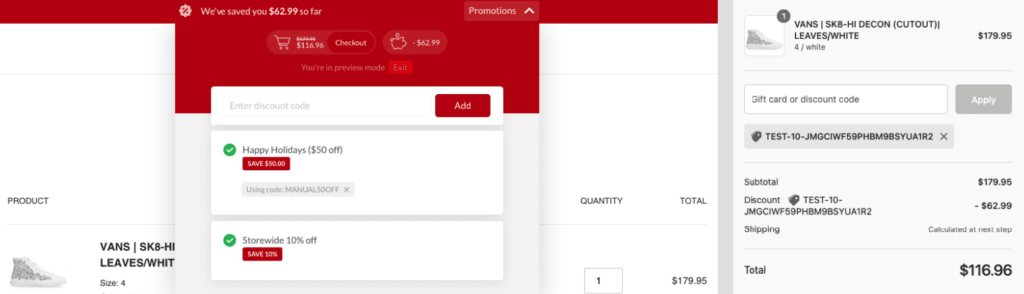
Successfully stacking discounts can feel like a victory, but navigating the fine print is crucial to avoid disappointment. Retailers often implement specific rules and exclusions that can prevent discounts from combining. Understanding these limitations is key to maximizing your savings and avoiding frustration at checkout.
Product Exclusions and Discount Code Limitations
Retailers frequently exclude certain products from discount stacking. This could be due to existing markdowns, manufacturer restrictions, or high demand. Also, limitations on the number of discount codes that can be used per transaction are very common.
- Exclusions Based on Product Category: Often, items in specific categories like electronics, luxury goods, or new arrivals are excluded from additional discounts. For example, a store might offer a general discount code, but it won’t apply to the latest gaming consoles or designer handbags.
- Manufacturer Restrictions: Manufacturers may dictate pricing and discount policies, preventing retailers from stacking their discounts on top of existing promotions. This is common with well-known brands.
- Clearance and Sale Items: Products already deeply discounted, like clearance items, are often excluded from further discounts. The retailer might consider the existing markdown sufficient.
- Code Usage Limitations: Some retailers limit the number of discount codes that can be applied to a single purchase. They might allow only one promotional code, regardless of the potential for multiple offers.
- Specific Code Conditions: Certain codes might only apply to specific items, or have a minimum purchase requirement. For instance, a code for 20% off might only work on full-priced items, or require a $50 purchase.
Clearance Item Restrictions
Clearance items, already heavily discounted, are frequently subject to restrictions regarding additional discounts. Retailers often price these items at their lowest possible point, making them ineligible for further markdowns.
- “As-Is” Pricing: Clearance items are often sold “as-is,” meaning the price reflects their condition and any existing defects. Additional discounts might not be offered because the price already accounts for these factors.
- Limited Inventory: Clearance items are usually the last of their kind, meaning inventory is limited. Retailers may choose not to offer additional discounts to move the remaining stock quickly.
- Combination Prohibitions: Clearance items might be explicitly excluded from promotional codes or other discounts. This is often stated in the terms and conditions of the sale.
Importance of Expiration Dates and Terms and Conditions
Carefully reviewing expiration dates and the terms and conditions of each discount is paramount. Ignoring these details can lead to disappointment at checkout when a discount fails to apply.
- Expiration Dates: Every discount code and promotion has an expiration date. If you attempt to use a code after this date, it will not work. Always check the validity period.
- Terms and Conditions: The terms and conditions detail all the rules associated with a discount. They Artikel which products are eligible, any minimum purchase requirements, and any other restrictions. These conditions may also clarify if discounts can be stacked or not.
- Read the Fine Print: Retailers often bury important information about discount stacking in the fine print. Take the time to read the entire promotional material to understand the rules.
- Example: A “buy one, get one 50% off” promotion may not be stackable with a 10% off coupon. The terms and conditions will clarify if this is the case.
Retailer Limits on Discount Application
Retailers commonly restrict the number of discounts applied per transaction to manage profitability and prevent excessive price reductions. This limit can vary depending on the retailer and the type of promotion.
- Single Code Rule: Many retailers only allow one promotional code per order. This is a common limitation.
- Combination Restrictions: Retailers may explicitly state that certain discounts cannot be combined. For example, a store might allow a discount on shipping, but not allow it to be used with a percentage-off coupon.
- Tiered Discount Systems: Some retailers use a tiered discount system. For instance, you might receive a discount based on the total value of your purchase, but this discount might not be stackable with other promotional codes.
- Example: A customer wants to use a 15% off coupon and a free shipping code. However, the retailer only allows one promotional code per order, so the customer must choose which discount to use.
Advanced Strategies and Techniques
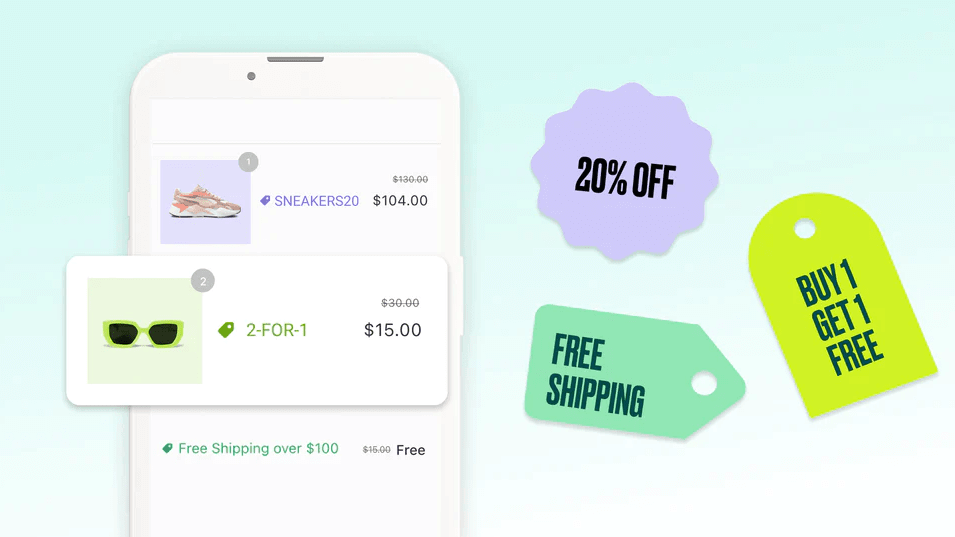
Now that you’ve mastered the basics of discount stacking, let’s delve into more sophisticated methods to maximize your savings. These advanced techniques require a bit more effort but can unlock significant discounts and benefits, turning you into a true bargain hunter.
Utilizing Browser Extensions and Deal-Finding Websites
Several tools can automate the discount-finding process, saving you time and effort. These tools search for coupons, compare prices, and alert you to potential deals.
- Browser Extensions: Browser extensions are add-ons that integrate directly into your web browser.
Examples include:- Honey: Honey automatically finds and applies coupon codes at checkout. It also offers price tracking and rewards points.
- Rakuten (formerly Ebates): Rakuten offers cash back on purchases from thousands of retailers. The browser extension activates automatically when you visit a participating website.
- Capital One Shopping: This extension compares prices across different retailers and automatically applies available coupon codes.
- Deal-Finding Websites: Websites dedicated to aggregating deals and coupons can be invaluable.Examples include:
- RetailMeNot: RetailMeNot is a popular website that provides coupon codes, cash back offers, and sales information for various retailers.
- Groupon: Groupon offers deals on local services, travel, and merchandise. You can often combine Groupon deals with other discounts.
- Slickdeals: Slickdeals is a community-driven website where users share and vote on deals. This can be useful for finding hidden or exclusive discounts.
Leveraging Multiple Email Addresses and Accounts
Many retailers offer signup bonuses, welcome discounts, or exclusive promotions to new email subscribers. Creating multiple email accounts can allow you to repeatedly take advantage of these offers.
The process involves:
- Creating Multiple Email Accounts: Use different email providers (Gmail, Outlook, Yahoo, etc.) to create several email addresses.
- Signing Up for Retailer Newsletters: Subscribe each email address to the newsletters of retailers you frequent.
- Tracking Unique Discount Codes: Keep track of the unique discount codes you receive for each email address.
- Using Different Accounts for Purchases: When making a purchase, use a different email address for each order to maximize the use of welcome discounts or other email-exclusive offers.
For example, a retailer offers a 15% off coupon for new email subscribers. By using three different email addresses, you can potentially receive three 15% off discounts on separate purchases, effectively saving more than if you only used one email address.
Taking Advantage of Price Matching Policies
Price matching allows you to receive the lowest possible price by comparing prices offered by different retailers. This strategy works by leveraging the competitive nature of the retail market.
The general process involves:
- Identifying Price Matching Policies: Research the price matching policies of retailers. Not all retailers offer price matching, and policies vary. Some may only match prices from specific competitors, while others may have time limitations or exclude certain types of sales (e.g., clearance items).
- Finding a Lower Price: Locate a lower price for the same product at a competing retailer.
- Contacting the Retailer: Contact the retailer with the price matching policy (either online or in-store) and provide proof of the lower price (e.g., a screenshot or a link to the competitor’s website).
- Verifying and Adjusting the Price: The retailer will verify the lower price and, if it meets their policy requirements, adjust the price of your purchase accordingly.
For instance, if you find a television at a lower price at a competitor, and Best Buy offers price matching, you can present the evidence and get the TV at the lower price, plus any additional discounts or rewards Best Buy may offer. Always review the terms and conditions of price matching policies, as they can be very specific. Some stores may also require the item to be in stock at the competitor.
Visual Representation of the Discount Stacking Process: Flow Chart
The discount stacking process can be complex. A flow chart helps to visualize the steps involved and the decisions that need to be made at each stage.
The flow chart would include the following elements and connections:
- Start: The starting point of the process, indicating the intent to make a purchase.
- Identify Purchase Item: The first step involves deciding what you want to buy.
- Research Retailers: A decision point where you explore multiple retailers that sell the desired item.
- Check for Coupons: A step where you actively search for coupons using browser extensions, deal websites, and other resources.
- Check for Sales and Promotions: Check the retailer’s website and other sources for sales, discounts, and promotional offers.
- Check for Cash Back Offers: Search for cash back opportunities through websites like Rakuten or specific credit card offers.
- Check for Price Matching Opportunities: Determine if price matching is an option and compare prices across retailers.
- Apply Discounts and Cash Back: This step involves applying coupons, entering promotional codes, and activating cash back offers.
- Calculate Final Price: A calculation step to determine the final price after all discounts and cash back are applied.
- Decision Points (Conditional): Several decision points throughout the process, such as whether to proceed with the purchase based on the final price, whether to utilize price matching, or whether to use multiple email addresses.
- Purchase Confirmation: The final step indicating the successful completion of the purchase with stacked discounts.
The flow chart uses arrows to represent the flow of the process, decision diamonds to represent choices, and rectangular boxes to represent actions or steps. The chart’s structure visually guides the user through the steps, helping them ensure they have considered all available options to maximize savings.
Specific Retailer Examples
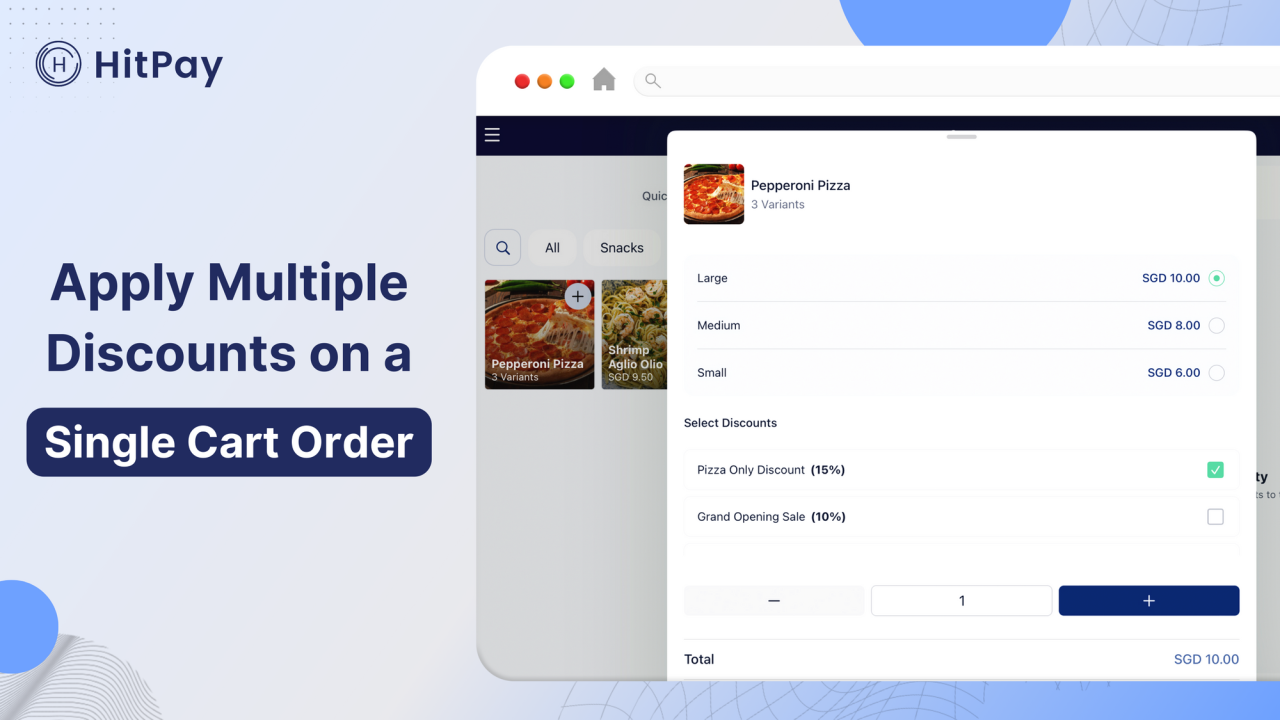
Understanding how different retailers approach discount stacking is crucial for maximizing savings. Policies vary widely, so knowing the specifics of your favorite stores can significantly impact your final purchase price. Let’s delve into the discount stacking strategies of a major player in the retail world.
Case Study: Target
Target is a well-known retailer with a diverse range of products, from groceries and clothing to electronics and home goods. Target offers several discount programs, making it a prime example for understanding discount stacking.Target’s discount offerings typically include the following:
- Target Circle Offers: These are personalized discounts and deals available through the Target Circle loyalty program. They can be storewide or specific to certain items or categories.
- Manufacturer Coupons: These are coupons issued by product manufacturers, often found in newspapers, online, or through mobile apps.
- Target-Issued Coupons: Target occasionally releases its own coupons, either physical or digital, for specific products or categories.
- RedCard Discounts: Target RedCard holders receive a 5% discount on almost all purchases.
- Clearance Items: Target regularly marks down items to clear inventory, offering significant savings.
- Promotional Sales: Target frequently runs sales events, such as seasonal sales or “buy one, get one” (BOGO) offers.
However, there are limitations and exclusions to be aware of:
- Manufacturer Coupons: These are typically accepted, but there may be restrictions on the number of coupons allowed per item or transaction.
- Target Circle Offers: These offers often have expiration dates and may be subject to item-specific restrictions. Some offers might not apply to clearance items.
- Target-Issued Coupons: Similar to Target Circle offers, these have expiration dates and can have limitations on the items they can be used on.
- RedCard Discounts: The 5% discount is generally applied after all other discounts and before taxes. There are some exclusions, such as gift cards and certain prepaid cards.
- Clearance Items: While clearance items offer already reduced prices, you may be able to stack additional discounts, such as Target Circle offers or manufacturer coupons. However, this depends on the specific terms of the offer.
- Promotional Sales: BOGO offers are usually applied before other discounts.
Here’s a summary of Target’s official discount stacking rules:
Target allows stacking of multiple discounts in specific ways. Generally, the order of application is as follows:
- Manufacturer Coupons: These are applied first.
- Target-Issued Coupons/Target Circle Offers: These are applied next, usually after manufacturer coupons.
- Promotional Discounts (e.g., BOGO): Applied after coupons.
- RedCard Discount: The 5% discount is applied last, before taxes.
- Clearance prices: Already reduced, may or may not be eligible for additional discounts.
It’s important to always read the fine print of each offer to understand any specific exclusions or limitations. Remember that the rules can be updated at any time, so it’s always best to check Target’s official website or in-store signage for the most up-to-date information.
Last Point
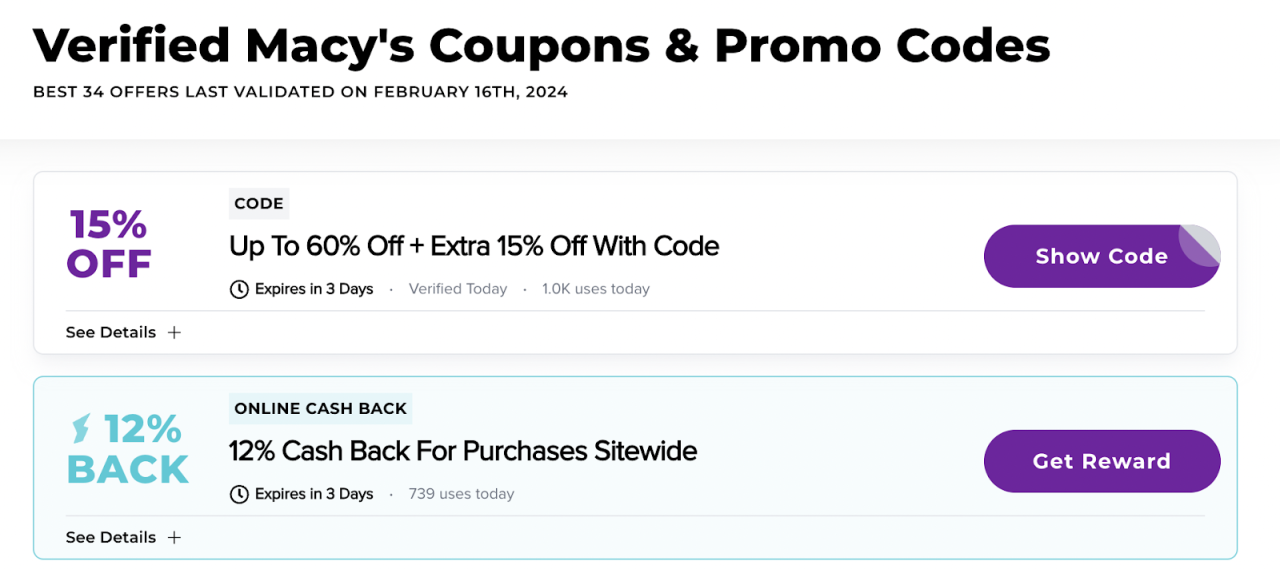
In conclusion, “How to Stack Multiple Discounts on a Single Purchase” equips you with the strategies and insights to become a strategic shopper. From understanding discount nuances to mastering advanced techniques, you’re now prepared to confidently navigate the world of deals. By applying the principles Artikeld, you’ll not only save money but also enjoy the thrill of the chase, turning every purchase into a rewarding experience.